
Lead magnet example
Quick contact tab
The pain it lands on
People get interested wherever they happen to be: halfway down a service page, under the prices, beside a photograph of a finished job. Getting in touch is always somewhere else. They open the menu, find the contact page, read a form with six fields and think about it one more time. Every step of that journey spends some of the interest that set them off.
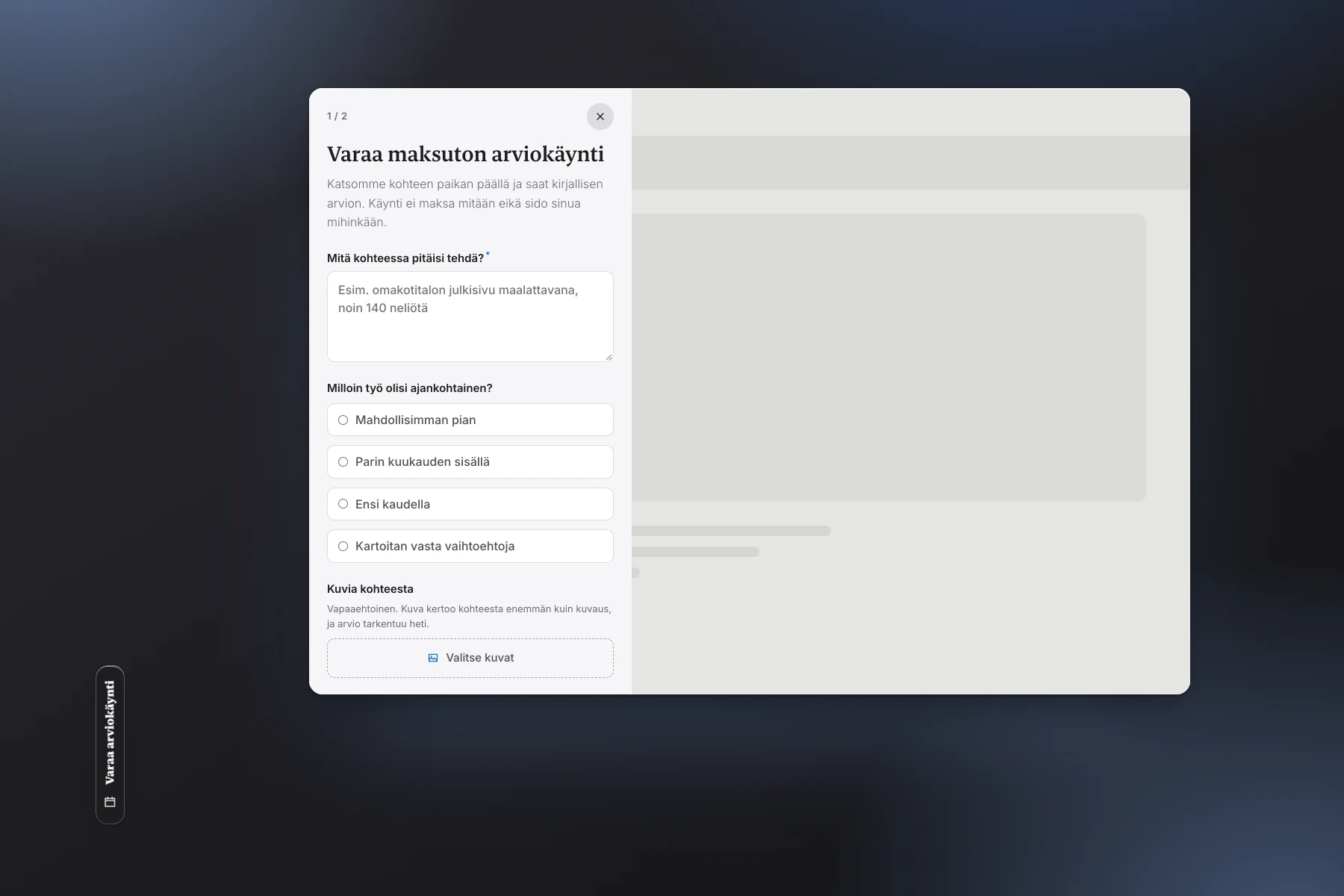
The tab removes the journey. It is fixed to the edge of the window on every page, always in the same place, and it takes no room on the page at all. One press opens the form over what they were reading, and they are still exactly where they were.
Why it produces leads
- It is visible when the thought arrives Not behind a menu or at the bottom of the page. Interest lasts seconds, and the tab is inside them.
- The tab promises something "Book a free visit" says what pressing it leads to. "Contact us" does not, which is why it gets pressed less.
- The job is asked for before the name The first step is what needs doing. Contact details come once they have already written their situation out.
- A photograph says what the words cannot They can attach pictures straight from the phone, and you see the job before you call.
- Nobody leaves the page The form slides over it instead of loading a new one. Closing it puts them back where they were, with what they typed still there.
- One line of code covers the whole site A single embed, and the tab is on every page. No separate form pages to build or maintain.
How it works
- The tab waits on the edge of the window Halfway down on a desktop, a third of the way up on a phone, which is where the thumb reaches.
- A press opens the form over the page The page behind dims. Escape, the cross or a press on the background closes it as fast as it opened.
- The job first, with pictures if they want What needs doing and when. Photographs are scaled in the browser, so a phone picture does not stall the send.
- Then the contact details Name and number, and the address of the job when that matters. Two steps, not a wall of six fields.
- A lead for you, a thank you for them The enquiry reaches your inbox with the pictures and shows up in your dashboard. They see it went through rather than wondering.
The form can be anything
- Book a free assessment visit What the demo does. It fits anything priced on site: renovations, painting, groundwork, property maintenance.
- Ask for a quote or a call back The shortest version: what you need and the number to call. Two fields are enough if that is what people ask you.
- Order a brochure, a price list or a sample They get something at once and you get an address. This is the tier where a lead costs 2.50 €.
- Sign up or book a time A course, an inspection or a demonstration. The form can ask which time suits in the same breath.
Where it belongs on your site
- On the whole site This is the one tool that does not compete with the page for room, so it can be everywhere rather than on one page.
- On the page your ads land on They came for one thing. The tab is that thing, and it is not two scrolls down at the bottom of the screen.
- Beside another tool A calculator or a visualiser takes the people who want to try something. The tab takes the ones who just want to talk to somebody.